
Download XoftSpy – anti-virus, spyware, malware, security, protection, computer
Overview
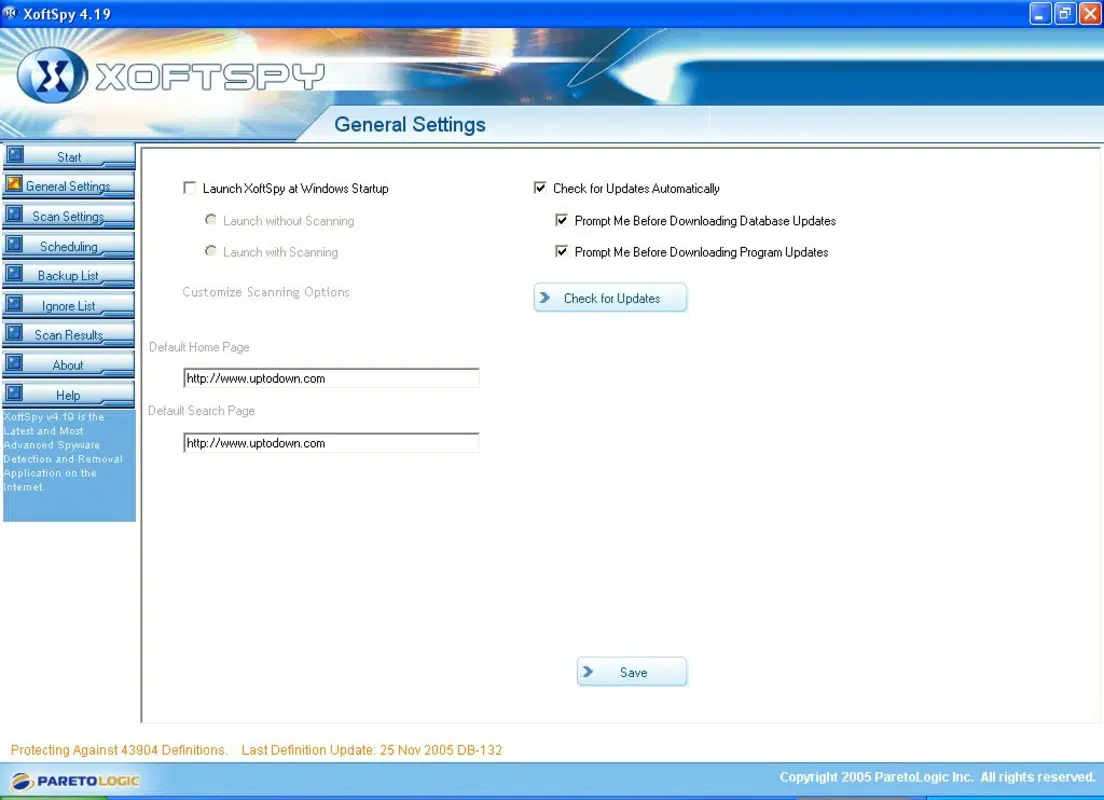
XoftSpy is a security-focused tool designed to address the persistent threat of malware infections on personal computers. Developed for users seeking reliable protection against digital threats, it targets common issues such as spyware, viruses, trojans, and keyloggers that often originate from unknown or suspicious files. The application aims to simplify the process of identifying and eliminating these threats, offering a streamlined solution for users who may struggle with detecting hidden or persistent malware. Its intuitive interface, reminiscent of Ad-aware, is tailored to support both novice users and those with more technical experience, reducing the learning curve associated with security software.
Although the developer did not provide additional background details, the app’s long-standing presence in the security ecosystem suggests a dedicated user base and a focus on core functionality. Real-world use cases include system cleanup after encountering suspicious downloads, routine maintenance to prevent data breaches, and post-infection recovery. In the broader context of digital security tools, XoftSpy fills a niche for lightweight, targeted malware detection without the overhead of full antivirus suites. Despite its age, the application remains relevant for users prioritizing simplicity and direct threat removal.
Key Features & Functionality
- Intuitive User Interface: Designed with usability in mind, the interface mirrors Ad-aware’s layout, enabling quick access to scanning tools and results. This visual consistency helps users navigate the app efficiently, minimizing confusion during critical operations.
- Comprehensive Threat Detection: With a database of over 50,000 entries, XoftSpy is capable of identifying a wide range of malicious entities, including spyware, malware, trojans, and trackware, offering broad-spectrum protection.
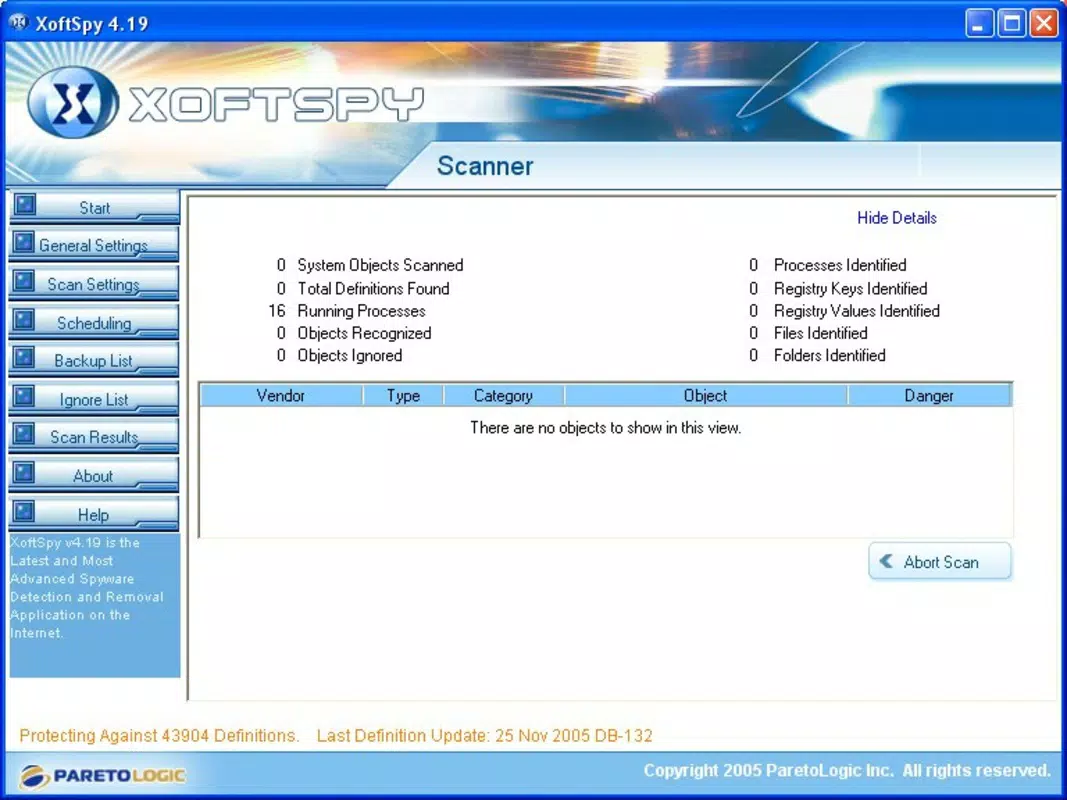
- Efficient Full System Scan: The tool performs deep scans across system directories and registry entries, detecting threats that may be hidden or embedded in legitimate files, ensuring thorough coverage.
- Automatic Threat Removal: Once threats are identified, XoftSpy initiates an automated removal process, reducing manual intervention and helping users restore system integrity swiftly.
- Regular Database Updates: The software supports periodic updates to its threat database, ensuring ongoing protection against emerging malware variants and evolving cyber threats.
For example, a user who downloads a file from an untrusted source can run XoftSpy to detect and eliminate any embedded spyware before it compromises personal data. Similarly, individuals experiencing sluggish performance due to hidden malware can use the full system scan to identify and remove root causes, improving system responsiveness.
Interface, UX & Performance
The user interface of XoftSpy reflects a minimalist design philosophy, prioritizing clarity and accessibility. Navigation is structured around core functions—scan, view results, and remove threats—ensuring users can complete tasks without unnecessary steps. Visual cues and status indicators guide users through each phase of the scanning and cleanup process, enhancing overall usability.
Although the developer did not list formal performance metrics, the app’s small file size of 1.5 MB suggests a lightweight footprint, which typically translates to low system resource consumption. This makes it suitable for older or low-spec machines where heavier antivirus software may cause lag. Responsiveness is expected to be consistent across different device categories, though specific benchmarks were not disclosed. Stability appears to be a core focus, given the app’s long-term availability and consistent functionality. Users can expect reliable operation during scans and removal tasks without frequent crashes or freezes.
Platform Compatibility & Technical Requirements
XoftSpy is designed for the Windows platform and requires a compatible Windows operating system. The software version is listed as 4.0, with a file size of 1.5 MB. The developer did not specify minimum OS requirements or hardware specifications, nor did they provide information on compatibility with modern Windows versions such as Windows 10 or 11. As such, users should exercise caution when installing on newer systems, as older applications may encounter compatibility issues.
Installation is straightforward, and the app operates without requiring elevated permissions beyond standard user access. The absence of detailed technical requirements means users must rely on trial and error or external sources to verify compatibility. Despite this limitation, the app’s small size and simplicity suggest broad potential for deployment across various Windows environments.
Pros and Cons
Pros
- Lightweight design with minimal system resource usage
- Intuitive interface inspired by widely recognized security tools
- Regular updates to maintain protection against new threats
- Automatic removal of detected malware for faster cleanup
- Free to download and use, making it accessible to all users
Cons
- Release date is from 2006, raising concerns about compatibility with modern systems
- Developer did not provide detailed technical requirements or OS compatibility information
- Limited functionality compared to modern antivirus solutions
- No support for mobile platforms or cross-device protection
- Lack of real-time protection features, relying solely on manual scans
FAQ
Is XoftSpy safe to download and install?
Yes, the application is free and available from official sources. However, users should ensure they download it from trusted platforms to avoid bundled software or modified versions.
Can XoftSpy protect my computer in real time?
No, the app does not feature real-time monitoring. Protection is limited to on-demand scans, meaning users must manually initiate detection and cleanup processes.
Is XoftSpy compatible with Windows 10 or Windows 11?
The developer did not specify compatibility with modern Windows versions. While some users may successfully run it on newer systems, it is not guaranteed to function without issues.
How often are the threat definitions updated?
XoftSpy supports regular database updates, ensuring users have access to the latest malware signatures. However, the exact update frequency was not disclosed.
Does XoftSpy require a paid subscription?
No, the application is completely free to use with no hidden fees or subscription models.
Final Thoughts
XoftSpy remains a functional tool for users seeking a lightweight, no-frills approach to malware detection and removal. While its age raises compatibility concerns, its core features—intuitive design, comprehensive threat detection, and automatic cleanup—still deliver value for users on older systems or those needing a secondary scanning tool. The lack of real-time protection and modern platform support limits its relevance in today’s dynamic threat landscape, but it serves as a reliable option for targeted cleanup tasks. For individuals prioritizing simplicity and cost-effectiveness, XoftSpy offers a practical solution. Download XoftSpy now.


